GTIN (Global Trade Item Number) is the number that identifies a trade item worldwide, issued by the company that owns the product as a GS1 member. The EAN-13, printed on the barcode of most products sold in Brazil, is the 13-digit GTIN. Google and marketplaces use the code to know which product is being sold.
Few fields in a product record cause as many problems as the GTIN. The marketplace bounces the listing, Google flags "missing identifier," and someone discovers that half of the color variations inherited the main product's code. The fix is usually manual, one SKU at a time, and only starts after sales have already stopped.
It helps to understand what this code is, why channels insist on it and which cases cause trouble.
What is the difference between GTIN and EAN?
GTIN is the name of the whole family of codes, and the EAN-13 is the 13-digit GTIN. There are also 8, 12 and 14-digit versions for other uses.
In Brazil, GS1 Brasil issues the company prefixes. The manufacturer licenses a prefix and generates the codes for its own products from it. That is why the code belongs to the product, not to the store: two stores selling the same saucepan use the same GTIN. The GS1 Brasil page on the GTIN code explains that it is the only entity authorized to issue GTINs in Brazil and that the bars are the graphic representation of that number.
Why the channel asks for the code
For a search engine or marketplace, the GTIN answers the question "which product is this?" without depending on how each store wrote the title. With it, the channel groups offers for the same item, shows the right product page and compares prices. Without it, the channel has to guess, and in many categories it simply rejects the listing or shows it less often.
So when a product has a GTIN, it belongs in its own field in the product record, not buried in the description.
The cases that cause trouble
- A variation with the parent's code. Each color, size or voltage sold separately is a different item and has its own GTIN. Copying the main product's code to the variations is one of the most common causes of rejected listings or mixed-up offers.
- A bundle assembled by the store. A bundle that the store puts together is not the same item as the product sold on its own. On Google, the rule for this case is to provide the GTIN of the bundle's main product and mark the item as a bundle (the
is_bundleattribute); on marketplaces, each one sets its own rule in its help center. - A product with no code. Handmade items, private-label products that do not have a prefix yet, spare parts. Channels usually have a path for these cases, generally by providing the brand and the manufacturer code. The mistake is to make up a number: a code that does not match the item is worse than no code.
- A wrong check digit. The last digit of an EAN-13 is calculated from the other twelve. A typo produces an invalid code that the channel rejects right away, and you can catch it before sending.
The GTIN attribute rule in Google Merchant Center confirms the first two points: each variant, by color or size, has its own GTIN, and the value must not be guessed or made up. For a product with no code, Google's page on unique product identifiers advises using brand and MPN. When the code has already caused a rejection, the post on disapproved products in Merchant Center shows how to attack it by cause.
Validate before you send
The cheapest way to handle GTIN is to check it in the product record rather than find out through a rejection. Three checks solve most of it: the field is filled in on the products that should have a code, the check digit matches, and no variation repeats another's code.
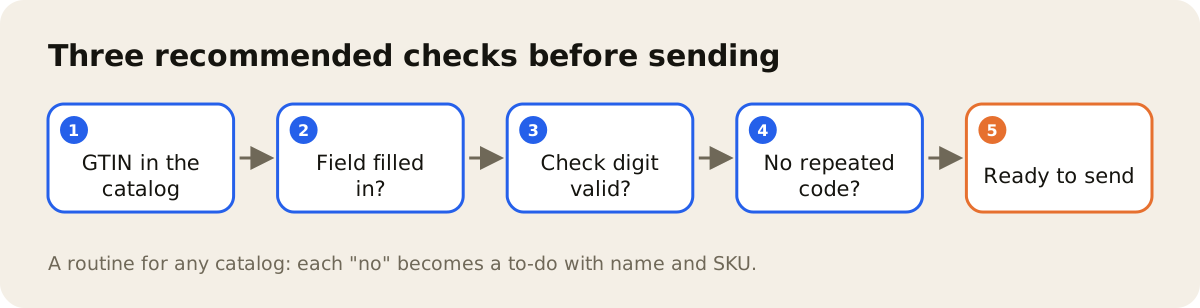
Done in bulk, this turns weeks of work into an issue list with product name and SKU. These checks fit into the routine for product data standardization.
GTIN in AdCore Turbo
In AdCore Turbo, the GTIN check happens in the product record, where each SKU shows which barcode reaches the VTEX store: its own, the one inherited from the model, the one that fails the check digit (that one is not sent), and the one that can't be attributed to a variation. The problem is visible per SKU; the fix is your team's, in the product record. How feeds work is covered on the feed management page, and the product record on the PIM page.
The number worth tracking is how many items show an identifier issue on each channel's dashboard. For the other fields Google reads, see the post on the product feed for Google.