The VTEX XML integration generates a file with the products from one of the store's collections, which you send to Google Merchant Center to advertise on Google Shopping. It works, but VTEX itself recommends its native Google Shopping connector as the default and advises against running the XML and the connector at the same time.
Most people who end up working on this XML got there for one of three reasons: products disapproved for price or availability, a catalog too large to check by hand, or a decision to switch tools. The question behind all three is the same: where does Merchant Center read the data from, and how far behind the store is it?
What is the VTEX XML integration?
The XML is set up in the Admin, under Store settings, Channels, XML Integration, with the New XML button. For Google Shopping, VTEX's instructions are to choose the Open XML (default) type, select a product collection and check the option to show the product with the default SKU data. When you save, the XML link is generated automatically.
The merchant has a lot of control: which collection goes in, the currency, the price format, whether unavailable SKUs show up and the name of each tag that VTEX fills in from its database. The store defines the structure, and Google reads whatever it finds.
VTEX's page on the Google Shopping XML carries two warnings: it describes a 2013 version of Google's specifications, which Google may have changed since then, and it points to a newer, API-based integration.
What usually goes wrong in the XML?
For each problem below, something to check before you touch the file:
- Price and availability out of sync. Google's product data specification asks that price and availability match the landing page and the checkout. According to VTEX, a change takes an average of two hours to show up in the XML, and Merchant Center fetches the file every 24 hours by default. What to check: the file's fetch schedule, which can be adjusted, and promotions that run for less than that interval.
- Items that drop out of the file. With the option to show unavailable SKUs unchecked, sold-out products stay out of the XML, and inactive products never make it in. What to check: that option in the XML and the product's status in the store.
- Apparel and accessories. Google asks for gender and age group for these products, and VTEX says to handle this by creating product specifications. What to check: whether the category has those specifications filled in.
- Price format. VTEX publishes a known-issue page about prices written with a comma in the XML. What to check: how your file writes the price.
When the item has already been disapproved, the post on disapproved products in Merchant Center shows how to tackle the most common causes.
XML or connector: what does VTEX recommend?
In its Google Shopping integration guide, VTEX says the connector it built should be the default choice, for efficiency and security. The connector is turned on in the Marketplace module with the account's Merchant Id and a sales channel (trade policy), which defines the assortment and the values sent.
Side by side, with the timings VTEX and Google publish:
- The store's XML. Set up under XML Integration. A change takes an average of two hours to reach the file, and Merchant Center reads the file every 24 hours by default.
- The VTEX connector. Turned on in the Marketplace module. According to the documentation on sending products, a processed change can take up to 30 minutes to reach the feed, and the connector resends the products every 29 days, before the 30-day limit after which Google expires an item that has not been updated.
- Feed manager. It sits outside the store, and the timing depends on how the tool publishes.
VTEX advises against using the Google Shopping XML and the connector at the same time, because that leads to conflicts and data discrepancies. When migrating, plan the switch so the same item never has both sources active at once.
When to keep the XML, switch to the connector or use a feed manager
Keeping the XML makes sense while the catalog is small, Google is the only destination, and price and stock change slowly enough to fit within the interval between reads. Switching to the connector is the natural step when promotions and stock change within a single day, and it is VTEX's default recommendation.
The XML and the connector send Google whatever is in the store. A feed manager, or a PIM with feeds, comes in when the problem sits upstream of the store:
- The data is not complete when it reaches VTEX. A spec sheet that arrives as a spreadsheet, a photo sitting in a folder, an attribute that exists only at the manufacturer.
- More than one channel reads the same catalog. Google, Meta, price comparison sites and marketplaces ask for different fields and formats.
- The feed needs rules. Sending only one brand, category or price range to a given channel.
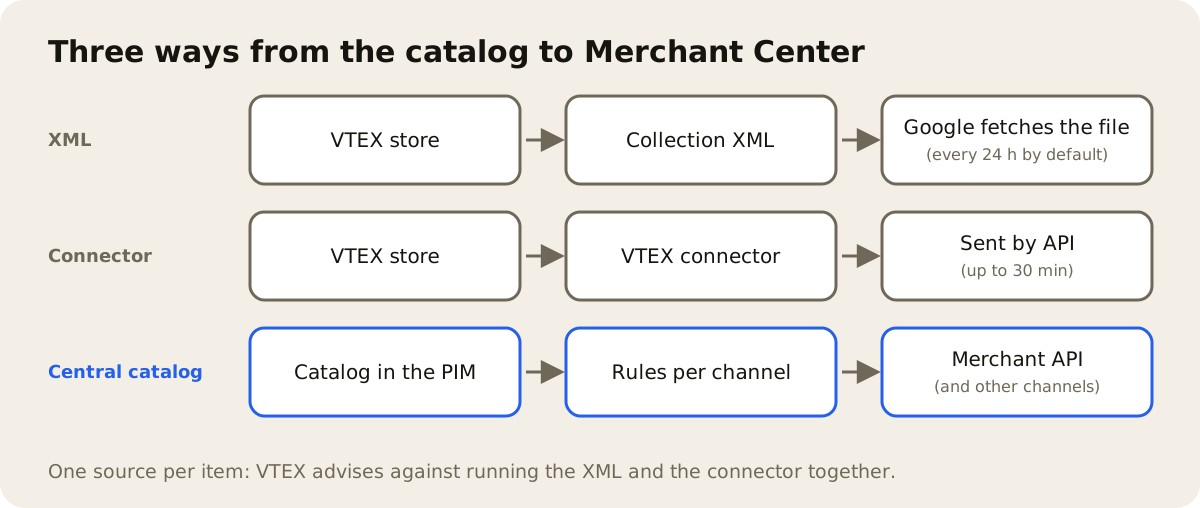
If a feed manager starts sending the item to Merchant Center, take that item out of the XML and the connector. Google doesn't separate products by data source: with the same ID and the same feed label, one submission overwrites the other, and it gets hard to tell which source the live data came from. The post on the product feed for Google covers the fields that matter most in that submission.
Where AdCore Turbo fits
AdCore Turbo brings together PIM, DAM and per-channel feeds. It works one step earlier, in the product record, and does not change VTEX's XML. For the items it publishes to Google, it becomes their source in Merchant Center, in place of the XML or the connector. The record lives in the PIM, and from there AdCore Turbo publishes to Google Merchant Center through the Merchant API and to the VTEX store catalog. The catalog is loaded into the PIM from a CSV spreadsheet.
In the feed path, Feed Health flags, at the SKU level, any required field that is missing, such as title, description, link, image or price, and gives each feed a score from 0 to 100. You make the fix once, in the product record, and every later publication, to the store or to a channel, goes out with the corrected data. The rules in feed management decide which products go to each channel, by brand, category or price.
It helps when the problem is a missing field or a scattered product record. A price mismatch caused by a promotion is a different matter: the price that goes to Google is the one in the product record, so a promotion created only in the store also has to reach the record before the next publication. The post on product setup in VTEX covers what to have ready before publishing to VTEX.