Product setup in VTEX is organized in four parts: the product, tied to a category and a brand; the SKUs, which are the sellable variations; the specifications, defined by category; and the images of each SKU. Publishing without rework depends on having these four parts ready before the product reaches the store.
In VTEX, the catalog is the center of the store: the storefront, search, filters and the catalogs sent to connected marketplaces all come from it. When a product record arrives incomplete, the problem spreads. The voltage filter does not work, the spec sheet shows up half empty, and the same product has to be fixed again on every channel that reads the store.
Many teams set up products directly in the admin panel, one at a time. It works while the catalog is small. With hundreds of launches per season, the panel becomes a bottleneck, and the rush produces exactly the kind of incomplete record that gets expensive later.
How does VTEX organize product setup?
It helps to be clear on the structure before preparing the data:
- Product. The general record: name, description, brand, category.
- SKU. Each sellable variation of the product, with its own code, dimensions, weight, barcode and images.
- Specifications. The attributes of the product and of the SKU, defined by category, which feed the spec sheet and the filters.
- Category. The store tree, which decides which specifications each product can have.
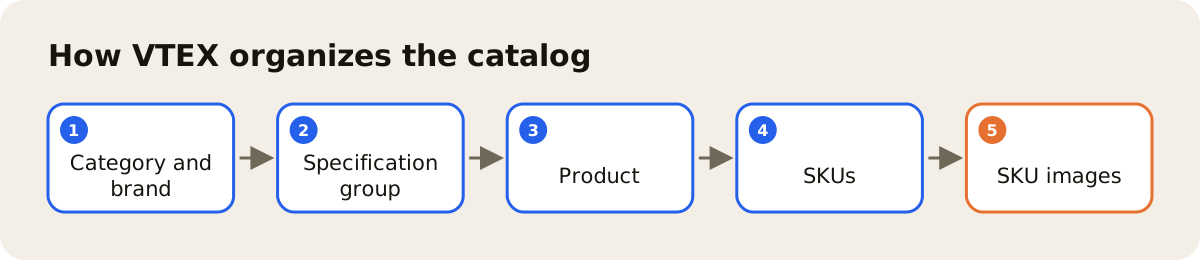
The details of the structure and the fields are in the official VTEX documentation, in the help center and in the developer portal. The VTEX catalog guide says that every product is tied to a category and a brand and has at least one SKU, and that all the specifications must be filled in for the item to become active. The general logic is stable: teams that prepare the SKU and the specifications properly before publishing avoid most of the rework.
What to prepare first
- A settled category tree. Changing the category of many products later affects specifications and filters, so finalize the tree before launch.
- Specifications by category. List which attributes each category has, with the accepted values. This is where the filters your customers use come from.
- A complete SKU. Code, barcode, dimensions and package weight. Wrong weight and measurements show up later in the shipping calculation.
- Images per SKU. Each color or variation with its own photos, in the right order.
- Reviewed text. Name and description in the store's standard, without the supplier's text pasted in.
The VTEX SKU guide asks for at least one image associated with the SKU and accepts the EAN as an alternative identifier. For the barcode, see the post on GTIN and EAN in ecommerce; for the photos, the one on product photos by channel.
Publishing without overwriting what is already in the store
Publishing through an integration takes extra care, because the store is not a blank slate. Products already exist, someone adjusted a field in the panel, a SKU was deactivated on purpose. It is worth agreeing beforehand which system owns each field, so that the integration and the team do not overwrite each other's changes.
It also helps to read the SKU in the store before writing and to check afterwards that what was written came out as intended. It seems slow, but it avoids the kind of error that only shows up when a customer complains.
How AdCore Turbo publishes to VTEX
AdCore Turbo publishes the product record to the VTEX store catalog. Before writing, it reads the SKU in the store, and afterwards it reads back what it wrote to check it. The product record itself lives in the PIM, with attributes by family, approval that records who approved, and version history, and the photos are linked to the SKU in the DAM.
If your catalog is already in VTEX, bringing it into AdCore Turbo is set up together with our team, through SKU webhook, CSV, Google Sheets or API, depending on the case. The integration details are on the VTEX page. The goal is to stop setting up products by hand in the admin panel and to reach the store with the record already complete. Before publishing, it is also worth reading about product attributes.