A product feed is the file, or the API submission, that takes a company's catalog to a sales or ad channel such as Google, Meta or a marketplace. Each channel asks for its own fields, categories and rules, and the job of a feed manager is to translate the same product record for each destination.
When someone says "we publish on several channels," the picture that comes to mind is usually simple: take the catalog, export it, upload it. If it were that easy, feed management would not be a discipline.
What actually happens is translation. The same product has to become different things for different destinations, and each destination has strong opinions about format.
Each channel speaks its own language
Google Shopping wants a GTIN, its own category taxonomy and rules about what can appear in the title. A marketplace wants a mapping to its own category tree, which looks nothing like yours. A paid media channel wants the image without text overlaid. A comparison site rejects the product if the brand field is missing.
The contracts are public. Google's product data specification marks which fields are required, and the Meta catalog reference marks each attribute as required or recommended. The Google product category attribute uses a category tree of its own.
Multiply that by every channel you sell on and the problem becomes clear: there is no such thing as "the feed." There is one catalog and several projections of it, one per channel, each following a different contract.
What does a feed manager do?
A good feed process lives in that transformation layer. Starting from the product record, it:
- Maps categories. It translates your tree to each channel's tree once and reuses the map.
- Applies rules per destination. It chooses what goes into each channel, with that channel's price, and respects what each channel accepts in each field.
- Points out the error before sending. A product missing a required field shows up with the reason on your dashboard, instead of being rejected without explanation at the far end.
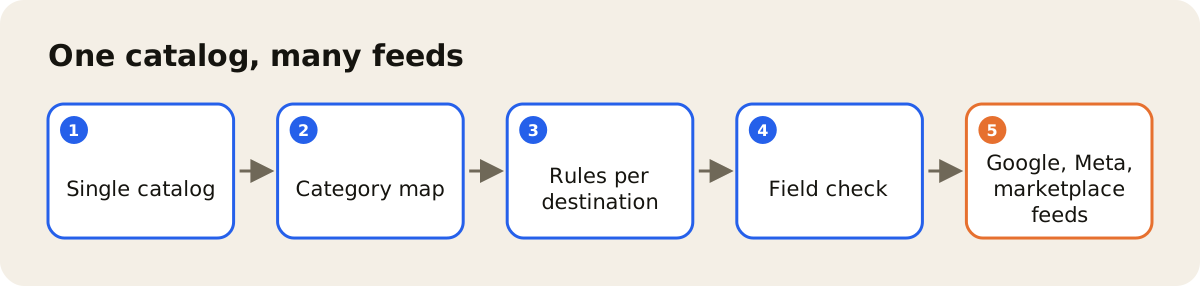
The difference between this and exporting a spreadsheet is the difference between an operation that grows and one that breaks at the fifth channel.
Completeness as a habit
The classic mistake is to treat data quality as something you measure after the fact. The product goes live, the channel complains, someone fixes it. The cheaper path is to look at completeness first: a product that does not yet have what the channel asks for waits in your system, on your schedule, not in a rejection email from the marketplace.
That completeness depends on a product record organized in one place, the subject of the post on the product data hub. The image each channel asks for comes from the same record when the photo lives next to the product, as the post on PIM and DAM together shows.
How AdCore Turbo does this
AdCore Turbo currently publishes to channels such as Google (through the Merchant API), Meta, TikTok, Pinterest, Criteo and Mercado Livre, with price and rules per channel. Before publishing, Feed Health points out, at the SKU level, the required field that is missing for the channel, such as title, description, link, image or price, and gives a score from 0 to 100 per feed; your team makes the fix in the product record. The full list is on the integrations page, and how feeds work is on the feed management page.
A well-built catalog should not turn into fifty product data jobs. It should be one job, projected to every place you sell.