Standardizing product data starts with a written rule, before any cleanup: how the name is built, which units are valid and which values are allowed. Then come four steps: take attributes out of the title, define what is complete in each family, measure completeness and fix in batches, with someone approving the changes.
Every catalog starts out organized. Then two more people join the data entry team, a supplier sends a spreadsheet in a new format, someone rushes a whole batch in to make a launch date. Two years later, the same refrigerator shows up as "Frost Free Refrigerator 400L," "FROST-FREE FRIDGE 400 LITERS" and "Refrig. FF 400l," and each version has a different set of fields filled in.
This is more than a cosmetic problem. The capacity filter in the store misses half of the products because some say "400L" and others say "400 liters". The marketplace rejects the listing because the voltage is in the title and not in the voltage field. The paid media team builds a campaign by category and finds that the category was filled in three different ways.
Start with the rule, not the cleanup
The most common reaction is to open the spreadsheet and start correcting. It works for a week. Without a written rule, the next import brings the same deviation back.
Before fixing a product, write down three things:
- How the name is built. A fixed order helps both the person searching and the person reading: product type, brand, line or model, the attribute that sets it apart (capacity, color, voltage). Choose the order that makes sense for your category and use the same one everywhere.
- Which units are valid. Liters or L, centimeters or cm, with or without a space. It seems like a detail until the size range filter stops working.
- Which values are allowed. The colors "Stainless," "stainless" and "Stainless steel" are three different values as far as the system is concerned. Wherever a value repeats, it should come from a list.
These three decisions solve most of the rework, because they turn a debate about taste into a rule that anyone on the team applies the same way.
Separate what is a title from what is an attribute
Many product records cram everything into the title. Capacity, color, voltage and warranty all end up in the name, and the structured fields stay empty. The title gets long, and the data that the filter and the marketplace read does not exist.
The practical rule: anything someone may want to filter or compare, or that a channel asks for as its own field, becomes an attribute. The title uses some of those attributes but replaces none of them. That way the same piece of data serves the store filter, the spec sheet and the marketplace's required field, without being typed three times.
Channels put this in writing. The Google Merchant Center product data specification lists each attribute as its own field and marks which are required, which are optional and which depend on the product or the country.
Define what "complete" means by family
A drill and a sofa do not have the same required fields. A single list of required fields for the entire catalog either asks too much (and people fill in anything to get through) or asks too little (and the essentials stay empty).
Group the products into families and decide, for each family, which attributes it needs to have. That lets you measure completeness: how many products in each family have everything they should. This number becomes the scoreboard for the standardization work and shows where to start.
Store platforms work the same way. In VTEX, the catalog documentation ties each category to a specification group, and all the specifications must be filled in for the item to become active in the store.
Fix by batch rather than by product
With the rule written down and completeness measured, fixing stops being handwork. Prioritize by what matters most (the families that sell the most or the products that are stuck on a channel) and fix in batches: all the capacity units at once, all the colors of one family at once.
And define who approves. When several people edit the same catalog, a change that is reviewed before going to the store keeps today's standardization from being undone by an import tomorrow.
How do you standardize product data, step by step?
The roadmap above fits in a list you can review at every new import:
- Write down how the name is built, in a fixed order by category.
- Define the accepted units and how to write them.
- Replace free text with a list wherever the value repeats, such as color and voltage.
- Take attributes out of the title and put each one in its own field. The attribute dictionary helps decide which fields exist.
- Check the identifier of each variation, with its own GTIN when the product has a code. The post on GTIN and EAN in ecommerce covers the SKU with no code.
- Define what is complete in each family and measure completeness.
- Fix in batches, starting with the families that matter most.
- Put an approval in place before the change reaches the store.
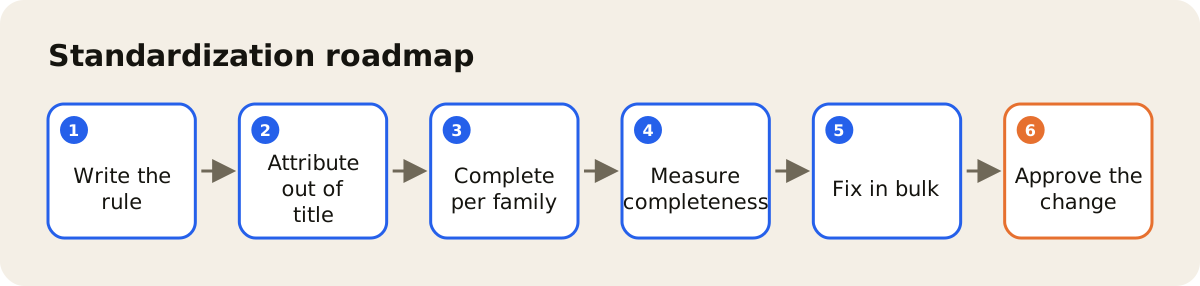
Anyone selling on VTEX will find the same roadmap applied to the platform in product setup in VTEX.
What AdCore Turbo does for this work
In the AdCore Turbo PIM, attributes are defined by family, and the completeness of each product and the average by brand appear on the dashboard. A change can go through approval, with a record of who approved, and the version history shows the before and after side by side. Import accepts CSV and Google Sheets, which helps bring the current catalog in before standardizing.
What you can expect to see day to day: the store filter finding the products, fewer listings returned for missing fields and the team no longer debating how to write "stainless". The next step is the attribute dictionary. If you want to see how this looks with your catalog, get in touch.